Showing posts with label young children. Show all posts

Friday, May 3, 2013

My Other Favourite Preschooler Apps List


iPhone Screenshot 4
Where's My Water?
So at the end of the week, I wanted to give you a list of all the great, fun apps that are out there that I just couldn't put down. Some are paid, some are free. I've listed and linked where appropriate.

Disney’s Where’s My Water? by Disney (Free for lite version. Full version 99c) Problem solving involving moving objects out of the way to connect water to Swampy’s bath tub. Great for children to start problem solving techniques on their own. A nice throw back to the Lemmings concept (for those old enough to remember it!).


Puzzle Farm;by Eggroll Games (Lite Version free, Full version $1.99) Farm themed puzzles which change as you complete them. Somewhat confusing but children would quickly get the hang of them. Unlock the extra levels from the main menu when you start as there doesn't seem to be a way to get back to the main menu once you have started the
puzzles. There might be, but I missed it.


Puzzles N’ Coloring Sea Adventures; by Better World (Lite Version Free, Full Version $1.99) Sea-themed drag and drop puzzles and touch-to-colour pictures.
The full version unlocks more of the same. Helpful music kill button..! Good for car trips.


Play School Art Maker by ABC Corporation (Free); Gorgeous app with fantastic content. Make art works that turn into movies. Record your own sound effects (watch out for this as you are likely to record yourself saying "How does this work?" etc the first time you use it). Save creations for later. Suitable for younger children and Play School loving adults. 
iPad Screenshot 1
Play School Art Maker
The Wiggles Big Aussie Road Adventure Presented by Volkswagen by The Wiggles (Free) When you think of the wiggles, you naturally think of Volkswagen. Travel around a map of Australia
solving drag and drop puzzles of the wiggles in various Australian landmarks and watch some wiggles videos on the way. Road safety messages are included in each puzzle and the volkswagens in each cartoon puzzle completely make sense when you remember the app was sponsored. Das Auto!

Awesome Eats; by Whole Kids Foundation (Free) Save carrots, lettuce and eggplants from their fate of ending up in the wrong box. This game gets very fast very quickly and will be frustrating to younger children but older, more experienced children (and adults) will find it challenging and entertaining. I liked the healthy eating message and graphics.

LEGO4+; by the LEGO Group (Free) Build your LEGO transport and move through Mario-style levels collecting LEGO pieces. A great app which is ridiculously popular with children who are into LEGO!

So there you have the results of my 7 hours of painstaking research! I would love to hear of your favourite apps in the comments or any successes and failures you have had with these ones.  Share the love!

* This is not a paid review. I have not received any compensation from the makers of ipad or the apps listed. All graphics are sourced from itunes. All opinions are entirely my own. 

Thursday, May 2, 2013

Tips for Using Ipads With Preschoolers

Using apps with Preschoolers can be tricky. Here are my (tried and tested) tips for making it easier.


iPhone Screenshot 1
Sandtimer App
Use a Timer
Nothing worse than a tantrum when the ipad has to go away or it is time for another child has a turn. I downloaded the Sandtimer app which you can set for different lengths of time to alert children when their time is up. Our kids simply hand the ipad over when the time is up and reset the timer themselves. Magic!

Make a List
In the classroom setting, an educator will help the children to write a list of the names of children who would like a turn. We usually put a child in charge of the list, explaining to them who is coming next and they can hold the list while people take turns on the ipad. This has to be monitored of course, but we found that a massive queue of children around the ipad for an hour was really eating into their play time. Now they know they will definitely get a turn at some point, they are happy to go and play elsewhere while they are waiting. 

Limit Screen Time
Current Australian Regulations recommend no screen time of any kind for children under 2 years. This is difficult and I know in home settings this is not always the case. Some great ideas for limiting screen time can be found here. For your interest, our centre has a TV that gets used between 5-10 times a year and only for 20 minutes at a time. The ipads are only available in the morning play session and children have 5-10 minute turns depending on the apps they are using. 

Pay for Quality Apps - and Check the Content!
If you are going to use an ipad for your child or in the classroom, make it worthwhile and only download quality apps that are actually going to benefit your child. I deleted some apps that looked cute but were useless once opened.

Turn Off the Wifi
Most free apps are lite versions of a game, meaning that you have to pay for the full version. If your itunes accesses your credit card, this can be a costly exercise as children will click on ads indiscriminately and charge your card ofr full versions and other apps. Turn off the wifi connection in your device's menu before you give it to your child. Most games do not need a connection to provide content, and those that do probably want your money anyway!

Don't Be Pressured
If you don't have a tablet device or smart phone that your child can use, don't fall into the trap that your child is somehow missing out on the techonology that they will grow up with. Most of us grew up without computers in our home as young children and coped just fine when they were introduced later in our lives in educational settings. Your kids will pick up the technology they need along the way without needing hours of screen time. Instead, teach yourself to feel smug that your kids are probably healthier than the 'ipad kids' anyway!

Just Say No
The devices in your life (and your children) shouldn't rule you. Set limits and stick to them. Take the device away and ignore the tantrum that follows. If it happens every time, then put the device away for a while until your child is older and more emotionally ready to handle the boundaries around it. Give your child time to run around after playing and burn off some of that pent up energy from the time spent in concentration.

The technology in our lives is there to help us, not to rule over us. If you feel enslaved by the devices - let the batteries run flat and "loose" the charger for a while. Take a walk together, have a picnic, read an actual book (don't have any? Visit the library together - they still exist, amazingly enough!). Enjoy life for what it is, and never think that an app - no matter how good it is - is a quality substitute for learning new concepts together. At best, it is a helpful addition. Your kids need time with  you too! 

Wednesday, May 1, 2013

Free Apps for Literacy and Numeracy that are Worth Your Time


Time to get to the free stuff!

These apps were listed free at the time of publishing. Each app focuses on literacy or numeracy concepts and met the criteria I set for myself. If you have other great apps in your collection, why not share them in the comments?

There are lots of these apps, so I did not do an indepth review of each, instead I have given you an overall idea and a link to check out the features of each app on itunes. Where apps require payment for more options I have said so.

Literacy Apps


ABC Alphabet Play by Grasshopper Apps (Free) – can set for phonics lower case. Choose the correct letter from four random options. US vocals and phonics.

Crabby Writer Phonics Read and Write by Mrs. Judd's Games (Free) – seaside themed letter tracing app. Choose 3 or 4 letter words, tracing based on phonetic sounds. US vocals and phonics

Ice Land! ABC Ilearnwithboing; By Tribal Nova (Free). 'Words' is free in light version, you have to buy phonics and letters levels. US vocals and phonics, lower and upper case. Parent tracking option available for tracking children's progress. Part of a series that includes apps for numeracy, shapes, colours, etc. The graphics are a little over-stimulating but children seem to love them.


iPhone Screenshot 1
Sound Touch
Sound touch by Sound Touch (Free). A great app for children learning vocabulary or 2-3 year olds. Click the cartoon animal and
see a photo of a real animal whilst hearing the sound that animal makes. Great for independent play or part of a group time. Categories include domestic and wild animals, birds, musical instruments, household items and transport. A great and easy app for bubs.


Giraffe’s Matching Deluxe by Tomato Interactive (Free). Standard memory match game with varying levels of challenge. Straight
forward and easy to pick up.


Photo touch Farm Animals; by Grasshopper Apps (Free) A basic photo match game. Easy to use and suitable for toddlers through to early preschool.

Also check out; I Like Books - 37 photo books in one. Great for early literacy. This is a paid app but one I thought worthwhile given the amount of content you get and quality of the photos. Mostly US terminology. 

What Does Not Belong by Brain Go LLC (Lite version Free): Pick from 5 photos the item that does not belong in the category and throw it in the trash bin. Some are a little hard to figure out! Lite version is free - if your children like it, you can fork out the $1.99 for the full version.

Numeracy Apps
iPad Screenshot 1
Springbird Maths
Monkey Preschool Lunchbox by THUP Games. (Lite Version Free. Full version 99c). One of a series, this cute and easy app reinforces colour, shape and object identification and has varying levels for children to progress through. Also check out the rest of the range. Worth the upgrade to full version. Some US terminology.

Springbird Maths Becomes very hard very quickly for preschoolers but would be great for those who are already familiar with math concepts and can identify numbers on their own. More suited to early primary. Pay for more levels and packs to unlock further gameplay.

Kids Patterns  by Laura Bangerter. Sequencing and number recognition suitable for 5-6 year olds who can identify numbers on their own. This is a paid app but there is also a lite version available to trial.

Feel Clock by Codsworks (Free): Great for teaching the time in a group setting. Would also be suitable for home use but it is not a game as such, rather a tool for teaching the time. I love that it teaches analouge primarily.

Tangrams; There are 100's of tangram apps for children and adults on the net. Unfortunately they are all call "tangrams" so I naturally can't find the link to the one I tested. But I've linked to a better one at the end of the paragraph anyway. Basic tangrams game. Way too many written instructions for pre-schoolers but click them through to the puzzle page and they will take off. One puzzle on the lite version. Unlock the full version at cost for 110 puzzles. Alternatively spend 99c and get this app instead for a higher quality graphic.

My Top Pick for Free Apps for Numeracy
Play Lab Series. By CJ Educations (Free) Play Lab and Play Lab 1 2 3 are awesome free apps that are fantastic for younger children from as early as 2 years (should you choose to use an ipad for children this young, be sure to limit screen time).

iPad Screenshot 2
Play Lab 
* This is not a paid review. I have not received any compensation from the makers of ipad or the apps listed. All graphics are sourced from itunes. All opinions are entirely my own.

Tuesday, April 30, 2013

Four Paid Preschool Apps You Cannot Miss

When you purchase an ipad, be prepared to spend a little to get the best content out there for your kids. If you stick to the free stuff, you can certainly find some great apps, but in some cases, the more you pay, the more you get. Here are my picks for paid apps you can't do without.
iPhone Screenshot 1
Bugs and Buttons by Little Bit Studio LLC. (Normally $5.99 - currently on sale for 99c!!) This app is a must have. Beautiful graphics, lovely music that you could actually stand to listen to, and great games for kids to play with no instruction from adults. In fact, they will have to explain it to you. The bugs theme of course makes it something that would especially appeal to young children, but its an addictively good app that I kept coming back to when my head was about to explode from over doing the QCat matching....
iPhone Screenshot 1
Little Bit Studio also produces similar apps called Bugs and Bubbles and Bugs and Numbers which are both very worthwhile. If you pay for anything, these are the ones to pay for. The 99c deal will not last long so get in quick.

iPhone Screenshot 1Also by the makers of Bugs and Buttons is the Dial Safe Pro app. This is a great app for teaching children how to call emergency services. I particularly like that you can customise for the Australian 'Triple Zero' as well as other versions. My only concern is that you would need to teach the children to use the actual phone setting in the emergency situation, not just the app! This is currently being offered for free.

iPhone Screenshot 1Green Eggs and Ham full version by Oceanhouse media ($4.49).  The classic Dr. Seuss read along. You can't go past this one! Yes, you could probably buy the actual book for less than the app, but the read along features are great and this app will help to build on basic sight words using a text many children are familiar with. Great for educators who have lost their voice for the day by 10am... Similar apps of other Dr. Seuss stories are also available.

iPhone Screenshot 1Little Writer Pro by Innovative Mobile Apps ($1.99) This should really get a mention in the literacy and numeracy post, but it is the best letter tracing app I have come across. It is fully customisable with lower and upper case letters as well as numbers and the option to add photos. Australian children are taught reading through phonics, so the phonic sounds were helpful, although the US vocals can lead to accent copying! With support from parents and educators, this is a great app to back up the phonics children are learning in real-life contexts.


There are my top picks for paid apps. This is by no means a comprehensive list, but they each meet my criteria and are worth the money and time spent.


 *This is not a paid review. I have not received any compensation from the makers of ipad or the apps listed. All graphics are sourced from itunes. All opinions are entirely my own. 

Monday, April 29, 2013

The Five Most Annoying Preschooler Ipad Apps of All Time


This list wasn't hard! After the first hour of research, I suddenly realised that some apps are free because no one should have to pay for this stuff. So right up front, I figured at the beginning of this series, here are the ones to really make parents and educators want to throw the ipad at a wall.
Here are the 5 most annoying preschool apps I discovered*.


iPhone Screenshot 1
 Preschool Memory Match by Kid Baby Toddler LTD. (Free) There are stacks of memory and matching type games available for kids. This creatively-named, hyped up matching game features annoying music and hard to discern graphics. A better alternative is the similarly named "Memory Matches" by IDC. 

QCat’s Fruit by Scott Chen (Free) features cantaloupe and pomegranates. The app has a weird pop-up mouse and a frowning,
floating cloud in the background that really bugged me. There are better apps out there for this kind of thing.


Kids can match all in one full version by Kids Place (Free). This one is less annoying than QCat’s Fruit, but better with the sound off!  Skip this one unless you are desperate to keep your content free (I started to realise that many of these free apps are cheap knock offs of others. Original content people!!).


iPhone Screenshot 4iPhone Screenshot 5
Kids tidy up  by Ning Cui (Free). Quite possibly my favourite ridiculous app of all time. A Steven Hawkings sound-alike bunny in a psychedelic artwork asks children to tidy rooms by dragging and dropping items into bins, cupboards and shelves. This app really creeped me out.  Maybe just ask them to tidy the actual room they are in...


Dr. Dino by Joy Preschool Game (Free) I felt torn about including this one. Its actually more funny than annoying. You will probably want to download it just to check it out. Help the dinosaurs feel better by putting the cogs back in the right part of their brains, tipping snot particles out of their nasal cavities and administering ear drops after sucking germs from their ear canal. Don’t even get me started on the moving-food-through-the-oesophagus-until-the-dinosaur-farts-bit. Hilarious and gross. Perfect for 4 year old boys.

So there you have my top five apps that you will get a laugh from. For the first 4 minutes anyway.
Enjoy! Feel free to share your annoying app reviews in the comments!

*This doesn't mean you shouldn't download them. Your kids will probably love them. But you won't really. 

** This is not a paid review. I have not received any compensation from the makers of ipad or the apps listed. All graphics are sourced from itunes. All opinions are entirely my own. 

Sunday, April 28, 2013

Preschool App Review Week

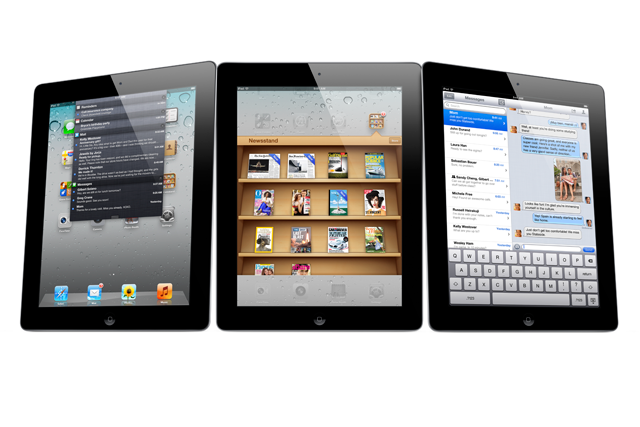
Image Credit
I recently had the pleasure of road testing an ipad for 7 hours to determine the best content for preschoolers with whom I work.

I have been requested to share the findings of my work. I have a lot to say after all that time, so I have decided to break up the info into a series for the week.

Monday: Five of the Most Annoying Preschool Apps of All Time for ipad.
Tuesday: Four Paid Preschool Apps You Cannot Miss
Wednesday: Free Apps for Literacy and Numeracy that are Worth Your Time
Thursday: Tips for Using Ipads With Preschoolers
Friday: My Other Favourite Preschool Apps List

The ipad I road tested came preloaded with content, some of which was paid, and some which was free. I played with the different apps for a while before I started to search out my own preferences on the itunes store. I pretty quickly realised that there are thousands of similar apps out there for children and some are clearly better than others. I became fussy pretty quickly!

Here are my criteria for what makes a good app for children.

  • The apps I am looking for are mainly for the 3 to 5 year old age group. Content that would also be useable for 2-3 years was also a bonus as we will have an ipad available for that age group too at the day care centre (with different limitations on use suitable for age). 
  • The child needed to be able, for the most part, to start the game themselves and respond to the content with limited teacher instruction. 
  • The app could be US based, but letter formation that sits closer to the Australian primary school fonts were picked over those with cursive letters or weird fonts. 
  • Australian children are taught lower case letters first in kindergarten. I picked letter writing apps that had the ability to choose a lower case setting or which were only lower case. 
  • Matching games that mostly used the Australian or English terms for objects were picked over those using US terminology. For instance "trousers" instead of "pants" or "texta" instead of "marker". 
  • Weird, annoying music or useless apps that had no real content were rejected. 
Screen time for children should be limited. If we are going to provide screen time for children then it needs to be for quality products! 

*This is not a paid review. I have no personal or professional affiliation with any product or company mentioned. All opinions are my own. 


Monday, July 2, 2012

The things I've learned...

I wrote this in Dec 2004 after finishing uni in my Early Childhood degree. I found this tonight and realised that there is some good advice here.

photo credit
I have just done a couple of full days at the Kindy where I'll probably be working next year. For those among you who are, have or ever will consider having children, here are some of my top tips. 

1. Check the child before you pick them up
She had just woken and was crying, so I picked her up and carried her around for ten minutes. Only then did she see fit to tell me that she'd wet the bed. 

2. Lable Everything
I washed my hands with clear glue. 

3. If a child looks sick, they probably are. 
I had only just passed her to another teacher when she threw up.


4. Forget telling a three year old "Don't spill it."   
It's just wishful thinking

5. "We like this story" Doesn't necessarily mean they want to hear it again, just that they've heard it before. 

6. "Watch him, he's a scratcher" is very good advice.


What you wish they'd taught you at uni.

Saturday, July 31, 2010

Book Review: Home Court Advantage


This is one of the books I have recently finished from my 30 Excellent Books in 2010 List

I tripped across it recently in a Christian Book Store for a bargain price ($3!) and thought it would be good to put in the parent library at work. 

I decided to read it first...and perhaps not put it in the library after all! 

Dr. Leman is a psychologist and a Christian and I have read a couple of his other books this year which have been great. 

This one just wasn't what I expected. 

Dr. Leman's view point is that children are given the very best to prepare for life when they spend the majority of time in a stable and warm family home environment. So far, so good. He gives many reasons for this and many I agree with no problem. 

As an Early Childhood Educator, I struggled with many aspects of this book. I agree that families really need to question whether both parents working full time is in the best interests of the children, but Dr. Leman goes further and suggests that Early Childhood settings are unhealthy and even damaging for some families... 

I'm being careful here, a lot of what he said rang true for me, but by the same token I am seeing the coin from both sides, and its a hard thing to do. 

I have often wondered whether I would be able to return to work in EC if I had young children. Its something we haven't really fleshed out in detail as yet. I think one thing is certain however... if I was a hairdresser, a builder or an office worker - anything but an early childhood teacher - I would probably find it a tiny (very tiny) bit easier to return to work.  This is purely because right now, my current job would have me being paid to look after other people's young children while paying someone else to look after my own... It's sort of too hard for me to get my head around.

And I don't think its a bad thing as such - its just a bit weird. I know lots of people who do it - some like it some don't. I'm not judging. I'm just not sure what I would do

I don't think there is a right answer as such - every family has to make their own choices and for their own best interests. It just made me think. 

I don't think everyone would agree with everything Dr. Leman has to say, and thats ok. It's just good to start the discussion. As far as the book goes, it was worth the read as it made me think and question some things, and I think good books should challenge you, whether you agree with them or not!

Any thoughts? 


Tuesday, July 6, 2010

Thanksgiving Tuesday - December 2009 List


121. Inquiring minds focused on God's plan
122. Faith that God works through all things to His glory
123. Sweet Christmas foods
124. Thoughtful encouragement from a Pastor
125. A reliable car
126. Cooling summer rain
127.Wonderful friends at church
128. Satisfaction in knowing God is at work
128. Bosciola chips!
129. Nacho pizza
130. Date night with my boy
131. Wise decisions from my husband
132. Prayers committed to faith in God's plan
133. Sleepless nights
134. Early nights
135. Wisdom of older women
136. Soft spikiness of his cheek
137. Firm touch of his hand
138. Dinner date night
139. Chilled out music
140. Moisturiser for dry hands
141. The will to study the Word
142. Made-up bed
143. Wonderful moments to treasure
144. Lifetime friends who know
145. Thousands crowding for carols
146. Candle light in the night air
147. Bat silhouettes
148. Clothes that still fit
149. Deep kisses
150. That last deep breath before their tears stop
151. Time to explain
152. Family loudness
153. Quiet fishing

Friday, January 1, 2010

Creative Play for Little Hands

I have been searching for ideas for open-ended toys for the children at Kindy. We have a lot of equipment that needs replacing in the next 3 years and I want to make good - lasting choices about the kinds of things that we can choose to give the children.

My criteria are the following;
- must be durable and long lasting - 45 children a day, 52 weeks a year
- preferably open-ended or multi-purpose
- cover a range of developmental areas
- no small parts - most toys in the center are used by children from 6 months to 6 years
- easy to clean and meeting Australian standards where required
- low environmental impact where possible
- cost-effective or low cost

Gee! I don't ask for much do I!

This is what I have come up with so far:
  • Playsilks
  • Discovery Bags - will have to alter the pattern as the plastic beads would be a choking hazard
  • Bilibo - I love this idea, but I think it is financially too expensive for the centre (we would ideally need 6-8 of these)
  • Home-made Dollhouse furniture that we could make ourselves with the children
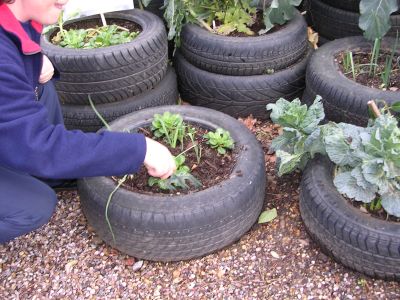
  • Tyre Garden Bed (see below) we already have tyres for free from a local tyre store. We just need to organise soil and plants!


Do you have any other ideas of things that we could make or provide for the children?

Sunday, April 5, 2009

Super Cute Palm Sunday Craft

We have just got back from a weekend down the coast camping. It was our first camping trip together - a very interesting experience as I love camping but my husband is not so keen! We had a great weekend although tired we are gearing up for creche at church tonight.

It is Palm Sunday so we have decided to tell the story of Jesus entering Jerusalem. I found a super cute template and colouring in pages for our youngsters here. There are lots of cute resources. I'm not up for reinventing the wheel so I'm more than happy to 'borrow' someone else's material!

I have cut the palm fronds out myself so the little ones can play with them and attached bbq skewers with tape to make stems.

Saturday, March 14, 2009

Help Around The House

I am still in the midst of wedding thank you cards, and preparing for my brother's wedding in 6 weeks time. Work continues to run ahead of me and the list seems ever longer - instead of shorter.

There is still much to be done in our home - especially in our guest room/office/computer and entertainment room - and some of this is waiting on the next paycheck to be able to afford furniture. But I am very blessed to have a husband who is willing and able to help me around the house.

I know in a traditional sense the house is the wife's domain, and it still predominately is. But it has been nice to know that when I am working flat out and tired, there is someone to help.

And help he does. He is even better at most household tasks (thanks to being raised in a matricarchal household of four boys) than I am! I believe when men are doing something they are happy to do, they really do often excell beyond that which we can do as women. Now I'm not trying to stake a take on feminist theory or anything like that. But there are certain realities of the physical design of the male body - its strength, core muscle power, its generally larger stature, that place men in the position of being able to achieve wonderful things - especially when they actually desire to help.

In my experience, my husband has always (even in the years we were friends before dating), all but tripped over himself to provide for me and to do things with and for me. When we were on our honeymoon in Malaysia, my new husband fell violently ill and spent four days in hospital. It was the first time I had ever seen him (necessarily so) so internally focussed - he is a giver and a provider, and it was almost unnatural for him to be this way. When he gives, he does so willingly and (usually) without keeping score!

During that time I read For Women Only by Shaunti Feldhahn. This book is the result of a large survey that took place for Christian and non-Christian men, inviting them to explore areas of their being, their needs and desires. It was fascinating to see some of the responses that men gave to her questions and I was amazing how much I learned about my husband of only a few days. I am still reaping the benefits of that understanding weeks later. Shaunti explores men's need to provide for their families - something that made me put down my guard about letting my husband help in "my domain" of the household! There are still inner designs that make me more likely to see the pile of washing and him less so (or prehaps we both see it and I am more motivated to do soemthing about it at the time?), but when he can do something for me, it builds him up internally. It is truly inspiring to watch him serve.

In my work with young children I have been taught to treat boys and girls as having the same strengths and skills. I struggle with this, because even from a young age, those behaviours and preferences that we say are only learned, seem to emerge on their own and in very familiar patterns.

The boys do spend more time with the block construction, the way they play with playdough is different, their writing or cognitive tasks like puzzles are often a solitary event, and it is usually more difficult to coerce them in to finishing their Mother's Day craft.
The girls have a more social take on cognitive activities, often selecting to do them together, role-playing games are focussed around family and everyday tasks.

There are expections, everyday and for every child. But those overall patterns still emerge even after years of early childhood settings providing open, inviting expereiences for all children. I struggle to think that our differences are a problem. I truly believe that God created us to complement and strengthen each other's differences.