Sunday, January 3, 2016

Why I will not be doing any more decluttering


Photo: My recent decluttering trick: Dump Everything On the Bed Then Spend Two Weeks Moving It Around. 

I realise there is an obvious gap here. Like, 2.5 years worth. And the short answer is life got in the way for a bit. I might get a chance to explain some of that if I keep this up. 

_______________________________________________

Decluttering. 

It's the current internet obsession. My newsfeed, instafeed, blog roll are full of New Year's challenges for decluttering your house in a week, a month, a year, forever. I've read the KonMarie book. I've read the Minimalist websites. I've joined the facebook groups, I've sold my stuff, I've thrown out bags and bags.

And here's the thing: I do not find decluttering fulfilling. 

I don't find it fulfilling because it's not what I'm made for. 

While I understand the concept of 'sparking joy' in your life, and keeping only things around you that make you happy, I have found decluttering to be stressful, upsetting and the number one cause of gigantic piles of mess in my otherwise neat-and-tidy-but-not-magazine-worthy house.

And after four or five weeks of trying to figure out the best way to sell my old stuff, who might want it or where else it could be stored, I have realised one thing, God made me for a bigger purpose than having a neat house. 

As the New Year rolls around, I'm focusing on what I learnt in 2015. Here is some of what I have figured out so far:

- I have some God-given gifts that are more useful to God, when they are employed outside my home. 
- I have the capacity to make new friends easily, and to help people talk through the things that separate them from God. 
- I can, when I ask God for the courage, be bold enough to ask them how they are going and if they want to come to church, or how I can pray for them. 
- I am in a new stage of life with a baby (whom we call Giraffe) and being a Mum is something that has helped me understand the concept of eternity more clearly. The time we have here is short and needs to be used to pursue God's glory for the people he places in our lives. 
- Having a giraffe opens a lot of conversational avenues for talking about God's work in my life and how His Story has shaped my own. This needs to be my starting point for writing my weekly To Do list, not which cupboards I want to get clean. 


See how none of that really had anything to do with decluttering? 

You know what else? The times I have had my house ridiculously spotless when people have come over, have been some of the most uncomfortable social visits I've ever had. Its like the more I try to impress, the more uptight and less friendly I actually am. I thought I was doing the opposite, but my friends seem to relax more when they don't feel like they are sitting in a show room. 

So my plan for this year? Priorities. 

1. Prayer
2. Play
3. Give
4. Grow

Prayer; I'm not worried about a specific system or a book or a way of praying like I've started the past few years. I just want to rekindle that prayer relationship I have had in the past by actually praying! 

Play: Instead of reading countless FB posts about other people's declutter or decorating missions, or giving my two cents on how to feed your Giraffe or get them to sleep better, I am going to spend more of my free time playing with my Giraffe. I have a lot to teach them and they have a lot to teach me, and I'm going to keep missing it if my head is buried in my iphone or my decluttering piles. 

Give: Aside from giving money, which is a joint discussion and decision my husband and I make together, I realised this past year that the biggest thing I can give many people in my life is time. Time to listen, support, laugh with, help. The opportunities are endless, and sometimes uncomfortable. But they are important. 

Grow: I've had a year of stunted spiritual growth. I've filled the void that I've felt with things that have distracted me from God. No more. Now, more Bible. More God. 

[Some might argue that priorities 2 and 3 should be the other way around. In the season of life that I am in, I need to focus on my roles as a wife and mum before giving of myself to others. I risk burnout when I do these the other way around - Believe me, I've tested that out.]

I'm interested to see where God takes me this year. I am bracing myself because I feel it will be a year of pruning. But God, in His infinite wisdom, knows exactly what he is doing. And I get the feeling its got nothing to do with the state of my cupboards. 

Friday, June 7, 2013

Another Easy Slow Cooker Soup

Another quick and easy soup in the slow cooker - with hardly any chopping!

Corn and Leek Soup

Add to slow cooker;

  • 2 leeks chopped very fine (pale part only)
  • 1 can of corn kernels (or two corn on the cob's worth of corn kernels)
  • Chicken stock (3 cups+)
Cover and cook for 6-8 hours on LOW or 3+ hours on HIGH. 

In the last hour, add 1-2 cans of creamed corn (depending on how thick you like your soup). 
When cooked through, blitz with a stick blender or put batches through a food processor for a smooth finish. This stores well in the freezer - simply heat up in microwave or stove top. 

GF with GF stock and vegetarian/vegan with vegetable stock. 

Nom.nom.nom. Have I mentioned I love my Slow Cooker?

Thursday, June 6, 2013

How I Made 3 litres of Winter Soup for under $5

My Mini Kitchen Garden
Colds. They are annoying.

Home sick today and thought I had better get some cooking done to get ahead in case its one of 'those' winters. I thought I would get my appliances working for me and make some soups for the freezer.

I think this one is my favourite - it was super cheap!

While shopping at Aldi last night I noticed Soup Packs of veggies for just $1.99. The pack contained two carrots, one swede, one parsnip, one potato, and two sticks of celery. bargain.

I chopped all this up and added;
- 1/2 cup of red lentils
- 3 teaspoons of crushed garlic
- A sprinkle of sea salt
- 1.5L of chicken stock (you might need more to cover the veggies)
- Some leftover BBQ chicken I had in the fridge
- A handful of chopped basil and oregano from my mini kitchen garden.

5-6 hours on LOW or 2-3 on HIGH in the slow cooker. Way. too. easy.

Use GF stock and its a GF soup. Vege stock and minus the chicken and you have a vegetarian/vegan option. Everyone wins! The principle for the slow cooker is the same. If you have one and are scared to use it, give this a go. You will not regret it.

Someone who is much much better at cooking than I am, and whose recipes are somewhat more accurate, check out my beautiful friend Jessica's blog home.

Friday, May 3, 2013

My Other Favourite Preschooler Apps List


iPhone Screenshot 4
Where's My Water?
So at the end of the week, I wanted to give you a list of all the great, fun apps that are out there that I just couldn't put down. Some are paid, some are free. I've listed and linked where appropriate.

Disney’s Where’s My Water? by Disney (Free for lite version. Full version 99c) Problem solving involving moving objects out of the way to connect water to Swampy’s bath tub. Great for children to start problem solving techniques on their own. A nice throw back to the Lemmings concept (for those old enough to remember it!).


Puzzle Farm;by Eggroll Games (Lite Version free, Full version $1.99) Farm themed puzzles which change as you complete them. Somewhat confusing but children would quickly get the hang of them. Unlock the extra levels from the main menu when you start as there doesn't seem to be a way to get back to the main menu once you have started the
puzzles. There might be, but I missed it.


Puzzles N’ Coloring Sea Adventures; by Better World (Lite Version Free, Full Version $1.99) Sea-themed drag and drop puzzles and touch-to-colour pictures.
The full version unlocks more of the same. Helpful music kill button..! Good for car trips.


Play School Art Maker by ABC Corporation (Free); Gorgeous app with fantastic content. Make art works that turn into movies. Record your own sound effects (watch out for this as you are likely to record yourself saying "How does this work?" etc the first time you use it). Save creations for later. Suitable for younger children and Play School loving adults. 
iPad Screenshot 1
Play School Art Maker
The Wiggles Big Aussie Road Adventure Presented by Volkswagen by The Wiggles (Free) When you think of the wiggles, you naturally think of Volkswagen. Travel around a map of Australia
solving drag and drop puzzles of the wiggles in various Australian landmarks and watch some wiggles videos on the way. Road safety messages are included in each puzzle and the volkswagens in each cartoon puzzle completely make sense when you remember the app was sponsored. Das Auto!

Awesome Eats; by Whole Kids Foundation (Free) Save carrots, lettuce and eggplants from their fate of ending up in the wrong box. This game gets very fast very quickly and will be frustrating to younger children but older, more experienced children (and adults) will find it challenging and entertaining. I liked the healthy eating message and graphics.

LEGO4+; by the LEGO Group (Free) Build your LEGO transport and move through Mario-style levels collecting LEGO pieces. A great app which is ridiculously popular with children who are into LEGO!

So there you have the results of my 7 hours of painstaking research! I would love to hear of your favourite apps in the comments or any successes and failures you have had with these ones.  Share the love!

* This is not a paid review. I have not received any compensation from the makers of ipad or the apps listed. All graphics are sourced from itunes. All opinions are entirely my own. 

Thursday, May 2, 2013

Tips for Using Ipads With Preschoolers

Using apps with Preschoolers can be tricky. Here are my (tried and tested) tips for making it easier.


iPhone Screenshot 1
Sandtimer App
Use a Timer
Nothing worse than a tantrum when the ipad has to go away or it is time for another child has a turn. I downloaded the Sandtimer app which you can set for different lengths of time to alert children when their time is up. Our kids simply hand the ipad over when the time is up and reset the timer themselves. Magic!

Make a List
In the classroom setting, an educator will help the children to write a list of the names of children who would like a turn. We usually put a child in charge of the list, explaining to them who is coming next and they can hold the list while people take turns on the ipad. This has to be monitored of course, but we found that a massive queue of children around the ipad for an hour was really eating into their play time. Now they know they will definitely get a turn at some point, they are happy to go and play elsewhere while they are waiting. 

Limit Screen Time
Current Australian Regulations recommend no screen time of any kind for children under 2 years. This is difficult and I know in home settings this is not always the case. Some great ideas for limiting screen time can be found here. For your interest, our centre has a TV that gets used between 5-10 times a year and only for 20 minutes at a time. The ipads are only available in the morning play session and children have 5-10 minute turns depending on the apps they are using. 

Pay for Quality Apps - and Check the Content!
If you are going to use an ipad for your child or in the classroom, make it worthwhile and only download quality apps that are actually going to benefit your child. I deleted some apps that looked cute but were useless once opened.

Turn Off the Wifi
Most free apps are lite versions of a game, meaning that you have to pay for the full version. If your itunes accesses your credit card, this can be a costly exercise as children will click on ads indiscriminately and charge your card ofr full versions and other apps. Turn off the wifi connection in your device's menu before you give it to your child. Most games do not need a connection to provide content, and those that do probably want your money anyway!

Don't Be Pressured
If you don't have a tablet device or smart phone that your child can use, don't fall into the trap that your child is somehow missing out on the techonology that they will grow up with. Most of us grew up without computers in our home as young children and coped just fine when they were introduced later in our lives in educational settings. Your kids will pick up the technology they need along the way without needing hours of screen time. Instead, teach yourself to feel smug that your kids are probably healthier than the 'ipad kids' anyway!

Just Say No
The devices in your life (and your children) shouldn't rule you. Set limits and stick to them. Take the device away and ignore the tantrum that follows. If it happens every time, then put the device away for a while until your child is older and more emotionally ready to handle the boundaries around it. Give your child time to run around after playing and burn off some of that pent up energy from the time spent in concentration.

The technology in our lives is there to help us, not to rule over us. If you feel enslaved by the devices - let the batteries run flat and "loose" the charger for a while. Take a walk together, have a picnic, read an actual book (don't have any? Visit the library together - they still exist, amazingly enough!). Enjoy life for what it is, and never think that an app - no matter how good it is - is a quality substitute for learning new concepts together. At best, it is a helpful addition. Your kids need time with  you too! 

Wednesday, May 1, 2013

Free Apps for Literacy and Numeracy that are Worth Your Time


Time to get to the free stuff!

These apps were listed free at the time of publishing. Each app focuses on literacy or numeracy concepts and met the criteria I set for myself. If you have other great apps in your collection, why not share them in the comments?

There are lots of these apps, so I did not do an indepth review of each, instead I have given you an overall idea and a link to check out the features of each app on itunes. Where apps require payment for more options I have said so.

Literacy Apps


ABC Alphabet Play by Grasshopper Apps (Free) – can set for phonics lower case. Choose the correct letter from four random options. US vocals and phonics.

Crabby Writer Phonics Read and Write by Mrs. Judd's Games (Free) – seaside themed letter tracing app. Choose 3 or 4 letter words, tracing based on phonetic sounds. US vocals and phonics

Ice Land! ABC Ilearnwithboing; By Tribal Nova (Free). 'Words' is free in light version, you have to buy phonics and letters levels. US vocals and phonics, lower and upper case. Parent tracking option available for tracking children's progress. Part of a series that includes apps for numeracy, shapes, colours, etc. The graphics are a little over-stimulating but children seem to love them.


iPhone Screenshot 1
Sound Touch
Sound touch by Sound Touch (Free). A great app for children learning vocabulary or 2-3 year olds. Click the cartoon animal and
see a photo of a real animal whilst hearing the sound that animal makes. Great for independent play or part of a group time. Categories include domestic and wild animals, birds, musical instruments, household items and transport. A great and easy app for bubs.


Giraffe’s Matching Deluxe by Tomato Interactive (Free). Standard memory match game with varying levels of challenge. Straight
forward and easy to pick up.


Photo touch Farm Animals; by Grasshopper Apps (Free) A basic photo match game. Easy to use and suitable for toddlers through to early preschool.

Also check out; I Like Books - 37 photo books in one. Great for early literacy. This is a paid app but one I thought worthwhile given the amount of content you get and quality of the photos. Mostly US terminology. 

What Does Not Belong by Brain Go LLC (Lite version Free): Pick from 5 photos the item that does not belong in the category and throw it in the trash bin. Some are a little hard to figure out! Lite version is free - if your children like it, you can fork out the $1.99 for the full version.

Numeracy Apps
iPad Screenshot 1
Springbird Maths
Monkey Preschool Lunchbox by THUP Games. (Lite Version Free. Full version 99c). One of a series, this cute and easy app reinforces colour, shape and object identification and has varying levels for children to progress through. Also check out the rest of the range. Worth the upgrade to full version. Some US terminology.

Springbird Maths Becomes very hard very quickly for preschoolers but would be great for those who are already familiar with math concepts and can identify numbers on their own. More suited to early primary. Pay for more levels and packs to unlock further gameplay.

Kids Patterns  by Laura Bangerter. Sequencing and number recognition suitable for 5-6 year olds who can identify numbers on their own. This is a paid app but there is also a lite version available to trial.

Feel Clock by Codsworks (Free): Great for teaching the time in a group setting. Would also be suitable for home use but it is not a game as such, rather a tool for teaching the time. I love that it teaches analouge primarily.

Tangrams; There are 100's of tangram apps for children and adults on the net. Unfortunately they are all call "tangrams" so I naturally can't find the link to the one I tested. But I've linked to a better one at the end of the paragraph anyway. Basic tangrams game. Way too many written instructions for pre-schoolers but click them through to the puzzle page and they will take off. One puzzle on the lite version. Unlock the full version at cost for 110 puzzles. Alternatively spend 99c and get this app instead for a higher quality graphic.

My Top Pick for Free Apps for Numeracy
Play Lab Series. By CJ Educations (Free) Play Lab and Play Lab 1 2 3 are awesome free apps that are fantastic for younger children from as early as 2 years (should you choose to use an ipad for children this young, be sure to limit screen time).

iPad Screenshot 2
Play Lab 
* This is not a paid review. I have not received any compensation from the makers of ipad or the apps listed. All graphics are sourced from itunes. All opinions are entirely my own.

Tuesday, April 30, 2013

Four Paid Preschool Apps You Cannot Miss

When you purchase an ipad, be prepared to spend a little to get the best content out there for your kids. If you stick to the free stuff, you can certainly find some great apps, but in some cases, the more you pay, the more you get. Here are my picks for paid apps you can't do without.
iPhone Screenshot 1
Bugs and Buttons by Little Bit Studio LLC. (Normally $5.99 - currently on sale for 99c!!) This app is a must have. Beautiful graphics, lovely music that you could actually stand to listen to, and great games for kids to play with no instruction from adults. In fact, they will have to explain it to you. The bugs theme of course makes it something that would especially appeal to young children, but its an addictively good app that I kept coming back to when my head was about to explode from over doing the QCat matching....
iPhone Screenshot 1
Little Bit Studio also produces similar apps called Bugs and Bubbles and Bugs and Numbers which are both very worthwhile. If you pay for anything, these are the ones to pay for. The 99c deal will not last long so get in quick.

iPhone Screenshot 1Also by the makers of Bugs and Buttons is the Dial Safe Pro app. This is a great app for teaching children how to call emergency services. I particularly like that you can customise for the Australian 'Triple Zero' as well as other versions. My only concern is that you would need to teach the children to use the actual phone setting in the emergency situation, not just the app! This is currently being offered for free.

iPhone Screenshot 1Green Eggs and Ham full version by Oceanhouse media ($4.49).  The classic Dr. Seuss read along. You can't go past this one! Yes, you could probably buy the actual book for less than the app, but the read along features are great and this app will help to build on basic sight words using a text many children are familiar with. Great for educators who have lost their voice for the day by 10am... Similar apps of other Dr. Seuss stories are also available.

iPhone Screenshot 1Little Writer Pro by Innovative Mobile Apps ($1.99) This should really get a mention in the literacy and numeracy post, but it is the best letter tracing app I have come across. It is fully customisable with lower and upper case letters as well as numbers and the option to add photos. Australian children are taught reading through phonics, so the phonic sounds were helpful, although the US vocals can lead to accent copying! With support from parents and educators, this is a great app to back up the phonics children are learning in real-life contexts.


There are my top picks for paid apps. This is by no means a comprehensive list, but they each meet my criteria and are worth the money and time spent.


 *This is not a paid review. I have not received any compensation from the makers of ipad or the apps listed. All graphics are sourced from itunes. All opinions are entirely my own. 

Monday, April 29, 2013

The Five Most Annoying Preschooler Ipad Apps of All Time


This list wasn't hard! After the first hour of research, I suddenly realised that some apps are free because no one should have to pay for this stuff. So right up front, I figured at the beginning of this series, here are the ones to really make parents and educators want to throw the ipad at a wall.
Here are the 5 most annoying preschool apps I discovered*.


iPhone Screenshot 1
 Preschool Memory Match by Kid Baby Toddler LTD. (Free) There are stacks of memory and matching type games available for kids. This creatively-named, hyped up matching game features annoying music and hard to discern graphics. A better alternative is the similarly named "Memory Matches" by IDC. 

QCat’s Fruit by Scott Chen (Free) features cantaloupe and pomegranates. The app has a weird pop-up mouse and a frowning,
floating cloud in the background that really bugged me. There are better apps out there for this kind of thing.


Kids can match all in one full version by Kids Place (Free). This one is less annoying than QCat’s Fruit, but better with the sound off!  Skip this one unless you are desperate to keep your content free (I started to realise that many of these free apps are cheap knock offs of others. Original content people!!).


iPhone Screenshot 4iPhone Screenshot 5
Kids tidy up  by Ning Cui (Free). Quite possibly my favourite ridiculous app of all time. A Steven Hawkings sound-alike bunny in a psychedelic artwork asks children to tidy rooms by dragging and dropping items into bins, cupboards and shelves. This app really creeped me out.  Maybe just ask them to tidy the actual room they are in...


Dr. Dino by Joy Preschool Game (Free) I felt torn about including this one. Its actually more funny than annoying. You will probably want to download it just to check it out. Help the dinosaurs feel better by putting the cogs back in the right part of their brains, tipping snot particles out of their nasal cavities and administering ear drops after sucking germs from their ear canal. Don’t even get me started on the moving-food-through-the-oesophagus-until-the-dinosaur-farts-bit. Hilarious and gross. Perfect for 4 year old boys.

So there you have my top five apps that you will get a laugh from. For the first 4 minutes anyway.
Enjoy! Feel free to share your annoying app reviews in the comments!

*This doesn't mean you shouldn't download them. Your kids will probably love them. But you won't really. 

** This is not a paid review. I have not received any compensation from the makers of ipad or the apps listed. All graphics are sourced from itunes. All opinions are entirely my own. 

Sunday, April 28, 2013

Preschool App Review Week

Image Credit
I recently had the pleasure of road testing an ipad for 7 hours to determine the best content for preschoolers with whom I work.

I have been requested to share the findings of my work. I have a lot to say after all that time, so I have decided to break up the info into a series for the week.

Monday: Five of the Most Annoying Preschool Apps of All Time for ipad.
Tuesday: Four Paid Preschool Apps You Cannot Miss
Wednesday: Free Apps for Literacy and Numeracy that are Worth Your Time
Thursday: Tips for Using Ipads With Preschoolers
Friday: My Other Favourite Preschool Apps List

The ipad I road tested came preloaded with content, some of which was paid, and some which was free. I played with the different apps for a while before I started to search out my own preferences on the itunes store. I pretty quickly realised that there are thousands of similar apps out there for children and some are clearly better than others. I became fussy pretty quickly!

Here are my criteria for what makes a good app for children.

  • The apps I am looking for are mainly for the 3 to 5 year old age group. Content that would also be useable for 2-3 years was also a bonus as we will have an ipad available for that age group too at the day care centre (with different limitations on use suitable for age). 
  • The child needed to be able, for the most part, to start the game themselves and respond to the content with limited teacher instruction. 
  • The app could be US based, but letter formation that sits closer to the Australian primary school fonts were picked over those with cursive letters or weird fonts. 
  • Australian children are taught lower case letters first in kindergarten. I picked letter writing apps that had the ability to choose a lower case setting or which were only lower case. 
  • Matching games that mostly used the Australian or English terms for objects were picked over those using US terminology. For instance "trousers" instead of "pants" or "texta" instead of "marker". 
  • Weird, annoying music or useless apps that had no real content were rejected. 
Screen time for children should be limited. If we are going to provide screen time for children then it needs to be for quality products! 

*This is not a paid review. I have no personal or professional affiliation with any product or company mentioned. All opinions are my own. 


Friday, April 12, 2013

Nourishing Habits

Photo credit
Is nourishing a new fad? Like detox?

I'm not sure but its something I've been preoccupied with a bit of late.
Between balancing work, house selling, packing ... my brain has been at times... ridiculously overwhelmed. At times I've struggled to cope with the demands of my life. One of my 'coping mechanisms  was to eat. Pretty much anything with sugar in it. In secret. It wasn't helping.

I also stopped exercising as my back had been playing up when I exercised and I was scared to do more damage. No need to point out the obvious issues so far.

So this is not going well. Brain is foggy from being over tired/lazy/sugar-dependent. Body is sore, blocked and sluggish [honesty time ok?] and overall I feel... not so crash hot actually.

After a day of eating mainly chocolate, I caught myself in the car on the way to Bible study with chocolate in my pocket, waiting for Awesome to look out the other window so I could sneak bites. And something snapped. What am I doing? I can't live my life like this. I'm paying a small fortune for gluten-free products and stuffing my body with crap on the other hand.

Enough.

Time for change. Simple life habits.

Back on the lunch from home bandwagon
Pilates twice a week
Cooking at home. Making things from scratch.
Drinking water
Bed early
Sleeping with the window open (helps you sleep better and not get as sick. apparently.)
Pray
Stretch
Walk
Talk to people. Process thoughts and feelings.
Seek out inspiration: read and search things that help me to process thoughts.

I feel better. I still eat some chocolate. But its not as much. And I'm trying not to be secretive about it.

I have a Pinterest board for nourishing habits. Helpful.

Thursday, April 11, 2013

And that was a long break.

So that was a pretty long 6 months. For reasons I don't really want to go into right now, I figured a break from blogging would be appropriate. It turned into a long break, with all the usual soul-searching questions about how much is too much to put on the internet and who is really reading this blog and should I really let them? 

Well, I've made some decisions about those things and I figured now is as good a time as any to return to the blogosphere (do we still say that? Its been a while...I particularly enjoyed how the computer tried to change that to 'hydrosphere'). 
While I'm still figuring out the details of what it is I would like to blog about, how often etc, I figure now is as good a time as any to update on my goals.
Menu Planning
I still menu plan weekly, although some of the details have changed. I use the same system I have spoken about previously, however Awesome now cooks on two set nights a week. These also happen to be the nights I am often out at meetings etc, so that if I am not home for some reason, Awesome is still planning the meal. I recently started a lunch box list to more consistently pack our lunches. More on that later.
Health
I am trying to focus on building long term habits rather than short term goals or weight loss. I plan to post about this too.
Mission Statement
My personal mission statement still stands. I revisit it regularly to realign my goals and track my priorities. I'm also keeping an eye on whether the  goals I have are founded in God's Word, and making changes when they are not. I'm not perfect. I get it wrong sometimes. 
Home
We came. We sold. We moved. Into my parent's house for a year while they are away so that we could save for a house. The move was challenging but in a head way. The apartment is where we got married. [not where we had our wedding. like, where we lived after that. Silly.] Moving was hard for me. Awesome does not like bugs. My folks bushland location has meant an influx of bugs and a sometimes unhappy Awesome. This is really the subject of a whole different post. We are learning how to live in a massive 5 bedroom, 4 garage, pool and two car house instead of a two bedroom apartment with no yard at all and a veranda we swept twice in 5 years. 
Heart
My heart has been knocked around a bit. A lot. Its been a big six months. I'm clinging on to God sometimes and sometimes I let go a bit. Thankfully He doesn't let go, so I'm ok. But I have learned the value in hanging yourself on your habits, and I have been trying to continue my quiet times each day. With varying success. 
I have some things to share. Hopefully helpful things. Its kind of nice to be back. Like comfy slippers. 


Monday, July 2, 2012

The things I've learned...

I wrote this in Dec 2004 after finishing uni in my Early Childhood degree. I found this tonight and realised that there is some good advice here.

photo credit
I have just done a couple of full days at the Kindy where I'll probably be working next year. For those among you who are, have or ever will consider having children, here are some of my top tips. 

1. Check the child before you pick them up
She had just woken and was crying, so I picked her up and carried her around for ten minutes. Only then did she see fit to tell me that she'd wet the bed. 

2. Lable Everything
I washed my hands with clear glue. 

3. If a child looks sick, they probably are. 
I had only just passed her to another teacher when she threw up.


4. Forget telling a three year old "Don't spill it."   
It's just wishful thinking

5. "We like this story" Doesn't necessarily mean they want to hear it again, just that they've heard it before. 

6. "Watch him, he's a scratcher" is very good advice.


What you wish they'd taught you at uni.

Feeding Time at the Zoo


polkadotmom.com

I reached breaking point one night when Awesome scraped most of his dinner into the bin. Again.

"Any chance we could have some time to plan decent meals for a change?" He asked. I wasn't offended. It was an honest question, and he was right, we had been eating a lot of toast, and throwing out a lot of perfectly good food that I hadn't taken time to cook. But that night, I knew I needed to make some changes to save us from eating over/under cooked creations of who-knows-what mixed together and called Dinner.

printable.tipjunkie.com
So I did what every modern wife does when trying to come up with a plan. I hit the 'net. I know how to cook. So that wasn't the problem. I own a large collection of pristine-looking recipe books. So that wasn't the problem either. It was planning. Or rather, failure to plan.

Someone should coin a saying about that.

Anyway, I google searched "menu planner printable" and there are a LOT to choose from. There are some very creative people out there with expensive publishing software. I graciously allowed them to do the hard work for me. I searched until I found something that met our needs exactly.

Here are our exact needs;
- One week at a time. Monthly planning scares me. And I already tried it and it just didn't work for me.
- No amount of colour-coding, or fancy scrapbooked tags that you stick up with blutac, is going to make me try harder in the kitchen. At the end of a long day at work, I need two things, a clear picture of what I want to achieve, and everything already in the fridge. I hate to shop on the way home from work (I'm allergic to people), so I have to have everything already in the house. Or we eat toast. I picked a simple planner that just covered the basics.
- Dinners only. Awesome gets his own food during the day, as do I, so I only wanted a dinner planner. I have a problem with empty boxes and lines. Its an Type A personality thing. Deal with it.
- We are not home every night, and frequently only one of us is home, and it can change, so a pen and paper list was not going to work for us, and I really didn't want to have to print a new one each week.
I picked a list that could be printed A5 and stuck it in a frame with glass - I use a whiteboard marker to write out the menu and make any last minute changes by rubbing it out with my finger. Classy.

Here's what I do;
1. We shop on sundays on our way to church. I'm not sure why. It's habit.
2. Because Awesome sleeps in on Sunday mornings, after quiet time in the morning, I grab my diary and menu planner and plan for the week. I work out what nights we are out and how many dinners need to be made at home. I also update the Google calendar (which IS colour-coded - see not totally slack) for Awesome so that he knows what is happening during the week.
3. I plan out what meals we are having, and then adjust my weekly vege and fruit box order online (it gets delivered to my work on Tuesdays so I plan around that and can tailor the order down to the last carrot, which is helpful for minimising waste.
4. I write out the meals and a quick shopping list for later reference, so that I know what to pick up and so that we don't spend one zillion dollars at the supermarket. It works well - I rarely spend over $80-$100 a week at the supermarket. Keep in mind that that is mainly dinners, lunch fixings and some minor breakfast foods - we do eat out of the house 1-3 times a week out of necessity, so that's where the balance of our grocery budget goes.
5. I then put it all away and move on with my day and don't have to think about planning a meal for the rest of the week.

Working full time in a job that has variable hours, and with a number of outside committments, I can safely say that I could care less most days about cooking when I get home. But I have been using this system now for three months, and most of the weeks have been so easy. Some times things come up, sometimes I'm just too exhausted to cook and we eat toast, or order-in. That's life and we are ok with that. But I can understand the kajillion women on the internet who post their meal plans each Monday. It actually does make sense. 

Because I'm sure that you care (!) here is this week's menu for us.

Monday: Polenta chicken homemade 'nuggets' and salad (the link is to Alana Chernila's website Eating From the Ground Up - but her recipe is in her book The Homemade Pantry - which I purchased recently and I am in LOVE with).
Tuesday: Baked zucchini and sweet potato chips with steak
Wednesday: Greek Turkey Meatballs with tzatziki and vegetable sticks
Thursday: Slowcooker Minestrone
Friday: Leftover night
Saturday: (store bought) Veal ravioli and napoletana sauce
Sunday: Cold wraps

We are actually home most nights this week, so this is a very 'fancy' week for us. Usually you would see a steak and salad, a chicken dish, a beef dish, pies made in the pie maker and toasted wraps. That's a standard week for us. This week I am also moving back towards a low GI diet and so I am including more low GI meals. 

Can you see how much I love food? How crazy long is this post????

Sadly I can't locate the exact printable I am using, but its best to find something you love any way, so get googling!

Sunday, July 1, 2012

Guess who's back?

Ok, so I'm well aware that this was a much longer break from blogging than I ever intended.

There are things happening in my non-blog life that have drawn me away from the screen for a while and I'm ok with that. Life is to be lived, and not merely observed, so if a break is needed, so be it.

Me and My Great Aunt - she's doing awesome for early 90's!
Recently I have talked to a number of people in real life who actually read this blog (hello out there!) and they have noticed my absence. Which is nice of them really. So I thought maybe it was a good time to reward their persistent loyalty with an update of sorts.

I wrote out my Personal Mission Statement at the beginning of the year and once a month or so I look over it. I am still working on every aspect of the goals I set, at varying pace, but I am pleased that I have been able to help others more with meals and practical help than I have in past years. I think this is due to a number of organisational steps I will explore in a later post.

Quiet time with God: I am still using this system to work through scripture, prayer and reflection on God's grace. It's a good system and it does work well, when I stick to it. My goal this year was not to get frustrated when I missed days (or weeks) of quiet time, but to just get back into it the next day. I have been keeping a record using stickers in a diary, of when I have quiet times. January was definitely the best month. But I am starting to get back on track now.

Food: I am still trying to work out how to balance my *love* of food with my need to eat well and treat my PCOS body kindly. Sadly I have put on even more weight this year, mainly due to inactivity and anxiety. But some recent health scares in my extended family have made me reevaluate my priorities, and I am trying harder to get back on track with food.

Decluttering: I undertook some big declutter missions since my last post on the subject. Our bathroom, laundry and kitchen are all flowing well and I don't have piles of stuff with no place to put it. My wardrobe has had one of its twice-yearly clean outs, and I hosted a clothes swap with some friends to help repurpose some items of clothing - it was actually a lot of fun! I can put all my clothes away in seconds and I now really only have the clothes I actually wear regularly and really need. I have to thank The Minimalist Mom and Small Notebook for their inspiration here, as I am naturally a bit of a hoarder!

One thing I have abandoned is my 366 days photo project. I found that I constantly forgot to take a camera with me most days and remembering to take a photo was another thing all together. I'm proud that I managed to blog a month of photos. Maybe I'll do a December round and we can see how the year started and ended...

Awesome and I are walking well together. Well, we call God our 'bungee cord' in that he holds us together when we try to pull away in frustration! We have been praying together most nights, which is not quite a bible study together, but its a start for us! We have been trying to make an effort to have regular date nights, but as we are out a lot, some times its easier to stay home and just be around each other.

Overall, even though things have been a little nuts this year - and its not the year of stillness I was craving, it is still a year of being intentional in many ways, and I'm thanking God for that!

Sunday, February 26, 2012

Coming to terms with decluttering

So there are a lot of changes and potential changes happening in our lives at the moment, and Awesome and I have been talking a lot about the amount of stuff we have and the fact that we are almost at a limit of the stuff we can put into our apartment right now.

We have put a hold on bringing new items into the apartment for the last few months and we have been seriously questioning the validity of each item in our home. Almost every cupboard has been gone through and items have been pared back until we have just the things we need. We have sold some appliances and a tea set we never used and didn't really love.  |

We have a few pockets of shelf space opening up which has helped us to clear up the areas where things get dumped in the house. But the interesting thing is that now that we have the space, we still don't have the burning desire to bring anything new into the house.

This fascinates me - we have reached a point in our lives where we are content with using what we have and we don't really need anything else. We have no plans to buy anything new for the house, or more clothes or games. We are simply replacing things as they break or wear out.

The only thing that we purchase regularly is books. We are big readers (Awesome more so than me) and we love books. Awesome now has a kindle which has saved us (and will continue to save us) countless shelves over the coming years as he reads 1-3 books a week. I have also got an ereader now and have been visiting the library lately. Even though we pay for online books, we don't have to worry about the space any more.

Its a very strange feeling to not really want anything much. At the very least it is helping us to reach our savings goal for the year.

How do you feel about stuff? Do you have a running list of things you need/want to purchase for your home or life? 


Saturday, February 25, 2012

The Sock Problem

I have a problem with socks.

I hate pairing them. Its the part of folding Mt. Foldmore that I just loathe. Its responsible for the entire basket of single socks (not odd socks, just ones that haven't found their mate yet...) that is taking up space in my bedroom. I refuse to admit that its been there for three weeks.

Its ruining my flow. Darn socks.

Awesome and I wear lots of black socks for work. It should be easy to tell our socks apart because his feet are a bijillion times bigger than mine. But, its not. This is because Awesome gives me his socks that don't 'feel right' and I quite enjoy wear giant socks. (its a weird thing I have, don't criticise)

I think it would take me hours to sort out all those socks... but I am having an idea....

I think that maybe we have too many socks. Maybe we are drowning in socks because we never throw out the non-comfy, complete-with-holes, don't-fit-that-good socks...

I will hold a sock throwing out ceremony and throw out all the cruddy socks. I'm not even going to pair them first. If they are cruddy I will throw out one and then I will throw out the other when I find it.

After the throwing out ceremony, I will pair all remaining socks. This is important. I will have to get over my hatred of sock pairing and just do it.

That will be the only socks we own then. If we want them, we will wash them. And that will be that.

I shall report back on my progress.

(sorry if this post was a little weird. I am very sick with gastro and dehydration which is making me a bit loopy I think...)

Thursday, February 9, 2012

Crafty Jars

This is a super easy craft that will cost under $5 to make (even less if you already own all the supplies!).

And its quick. Real quick. And cheap. and cute. etc.

You need:
3 (or more) glass jars collected from various things you eat eg. jam, chutney, marinade sauces. Different sizes and shapes works best.
White paint. I used Jo Sonja's as its about $3.50 a tube (sometimes less) and I love the vibrancy of the pigment. This is titanium white. You can mix any colour you like really.

Simplicity is the middle name of this craft.


Blob some paint inside a clean, de-labelled jar. 


Use your brush to paint the insides of the jar

Allow to dry and then apply a second coat.

Tie some thin ribbon, lace or raffia around each jar.

Sigh and pat yourself on the back for being so clever. 

Wednesday, February 8, 2012

February Update


How is it possible that February is here already? Time for a quick update on all things LordGirl.

My Mission Statement.  I have tried to review this each week. So far I have been feeling like my relationship with God and my marriage are areas that are tracking well as I have poured the time I have had into them. Work is going well, praying each day for safety and calmness has been a learning curve as there have been days that haven't turned out like that at all! But my attitude and how I have handled myself has really improved and I have even done a lot better at watching my tongue.
My commitment to prayer is going well. I have been writing down prayer points for people who need or ask for prayer and have been following through with letting them know I'm praying most of the time. I have been very blessed to have some beautiful friends offer to pray for me while I have had some 'big' stuff going on in my family life.
Physical, Household and Personal development areas were going well at the beginning of the year when I was on holidays from my extra-curricular activities. But as soon at things got busy, my routine started to slip. My first method to fix is going to bed at a reasonable hour and waking early for my bible study and prayer time. This last week has thrown my routine out and I realise its only me that can fight to change it back.

The Year of Intentional is proving difficult. I am slow to change and I need God's press on my heart each day to help me to think outside myself and my slavish desires. This week I want to take each day one at a time and take a few moments to let someone in my life know that I am thinking of them and praying for them.


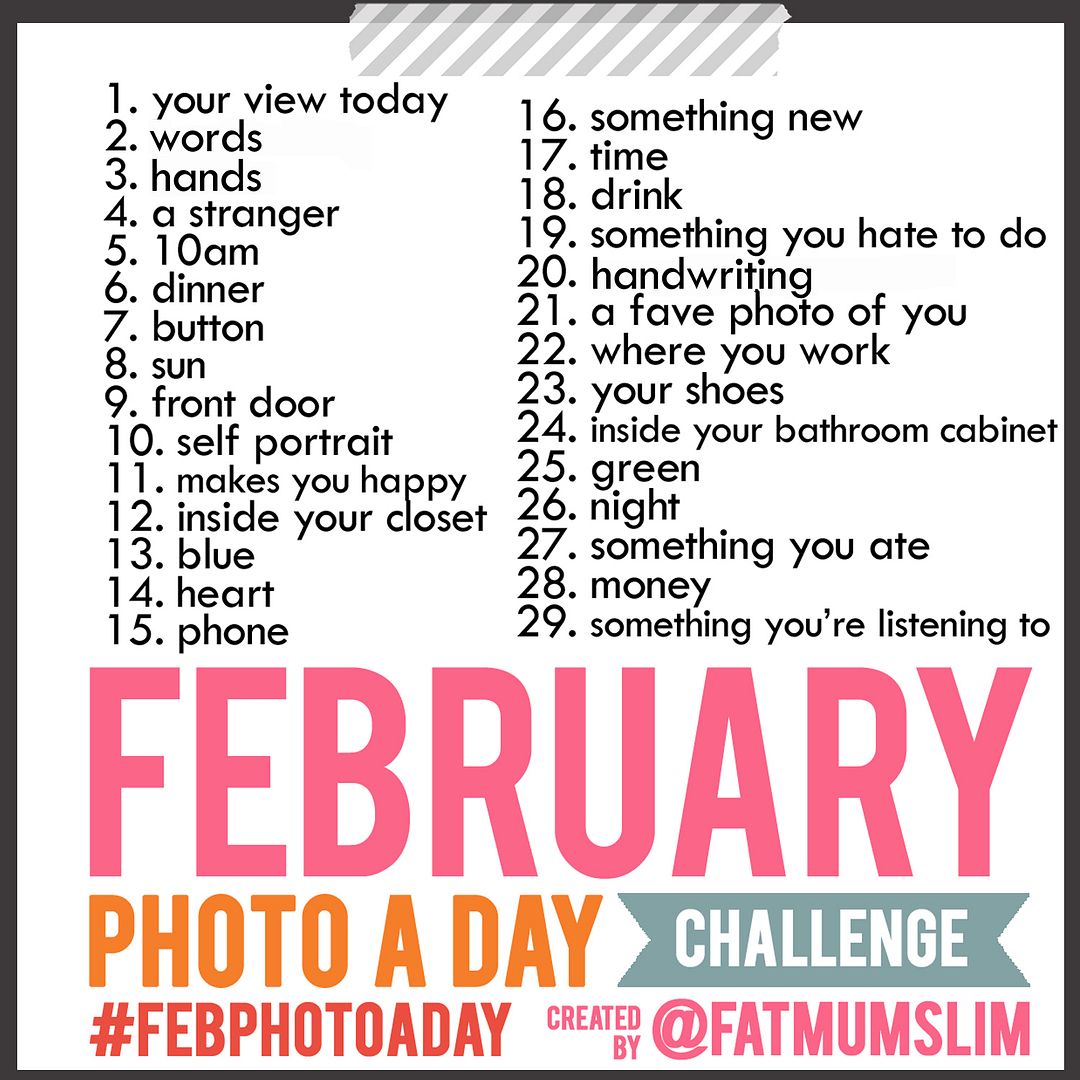
2012:366 Photo-a-day project. I have struggled with this one this last few weeks. Awesome has started a photo a day project based on his hobby which means I am no longer carying the camera on me regularly, which has meant that I've forgotten to take some photos. So I am going to use the February photo challenge at Fat Mom Slim to get me back on track.

Overall, I am learning that being intentional is not easy. It's shaping. Slowly melting away the lazy and hard parts making the change difficult. It takes effort and work and pushing myself to do things that scare me everyday. February promises more of the same and I am blessed everyday to be able to get up and work on living for Jesus daily.

How is your February going? Are you still working on the goals you had earlier in the year?

The Liebster Award


The lovely Katie at The Imperfect Housewife has nominated Lord Girl for a blog award. I'm so proud - my very first one :) Thanks Katie for thinking of me! 

The Liebster blog award (German for favourite) is a blogging award. 
 The rules of the Liebster blog are as follows:
1. Say thanks to the amazing blogger who awarded your Liebster and link back to 
    their blog
2. Choose 5 fantastic blogs and leave a comment on their blog letting them know. 
    (They must have under 200 followers)
3. Post the award on your blog. 
   (Right click on the award image and save it to your hard-drive and then upload it to 
    your blog)
4. Enjoy your Liebster award
5. And best of all – have fun and spread the leib!

Katie has already awarded the lovely Lozzz123 and MzDirector - definitely check out their blogs if you haven't already. 

My Nominees are:

1. Kim at Kimlovesjozi 
2. New blogger Jessica at 'to love'
3. Rebekah at justfordaisy

Thanks again Katie for your nomination!

Saturday, January 28, 2012

Being Prayed For

Its always nice to know that you are being prayed for. God hears and works through our prayers.

Tonight, Awesome and I are babysitting our friend's gorgeous boys. We love hanging out with the boys, who are 6 and 2. We've been babysitting them a couple of times a year since Mr. 6 was 18 months old. As there are usually gaps between visits, we have the pleasure of seeing giant leaps in their development each time we see them.

Tonight was a fantastic night, lots of laughter, crashing things around (as boys are wont to do!) and just a little wheedling to try and get out of bedtime ;). We are always impressed with the boys behaviour, they are incredible, polite little guys who know their routine and are never any trouble (for us at least!).

The wedding picture Mr. 6 has on display
At bed time, Mr. 6 took pride in showing us his treasures collected since our last visit. On a pinboard was some flyers about mission work in Nepal and a photo of Awesome and I from our wedding.

"I've been praying for you." Mr. 6 said.

We didn't know what to say. The children I work with are mostly not from Christian homes. Awesome hasn't spent a great deal of time with young children in the last few years. That a 6 year old whom we love and love to hang out with, would be praying for us, well, it came as a bit of a delightful shock!

We give credit to his fantastic parents and the way they have really worked to instill a sense of caring for others in their boys. Its wonderful to know we hold such a special place in Mr. 6's life, just as he does in ours.

Praying for you too little buddy!

{Its currently 9:30pm and Mr. 6 has just got up for the second time, which hasn't happened before when we have visited. He's agreed to go to sleep now but we'll see. Starting to get an idea of the bedtime struggle that some parents deal with regularly!}